Starlink Power Consumption: What It Actually Costs an Off-Grid System

A Gen 3 Standard Starlink uses 75 to 100 watts. A Standard Actuated uses 50 to 75. A Mini uses 20 to 40.
There you go. That’s Starlink power consumption, straight off Starlink’s own support page, and you’ll get the same figures from every other result on this page.
Now here’s the thing that took me a few days of forum reading to properly understand. Those watts are measured at a wall socket. If you’re off grid, you don’t have a wall socket, you have a battery bank and an inverter standing between the two. And on one cabin setup I found written up in detail, the inverter was drawing more power than the Starlink was.
Not a bit more. 960 watt hours a day against the dish’s 720.
So the spec sheet is right and it’s still the wrong number to size a system against. This is the rest of it: the surge, the inverter tax, the winter problem, and the siting conflict that only shows up when you own both a dish and a solar array.
The official numbers, so we’ve got a baseline
Credit where it’s due, Starlink publishes this openly, which is more than you can say for half the propane industry. Straight from Starlink’s own power support page:
| Model | Average | Idle |
|---|---|---|
| Standard Actuated (Gen 2) | 50 to 75W | 20W |
| Standard (Gen 3) | 75 to 100W | 20W |
| High Performance / Flat HP | 110 to 150W | 45W |
| Mini | 20 to 40W | 15W |
That’s the antenna, the router, the power supply and the cables together, which is the right way to count it.
Now here’s everything that number doesn’t tell you.
Thing one: the startup surge, which is roughly double
This one should be familiar if you’ve read anything else on this site, because it’s the same story as a well pump.
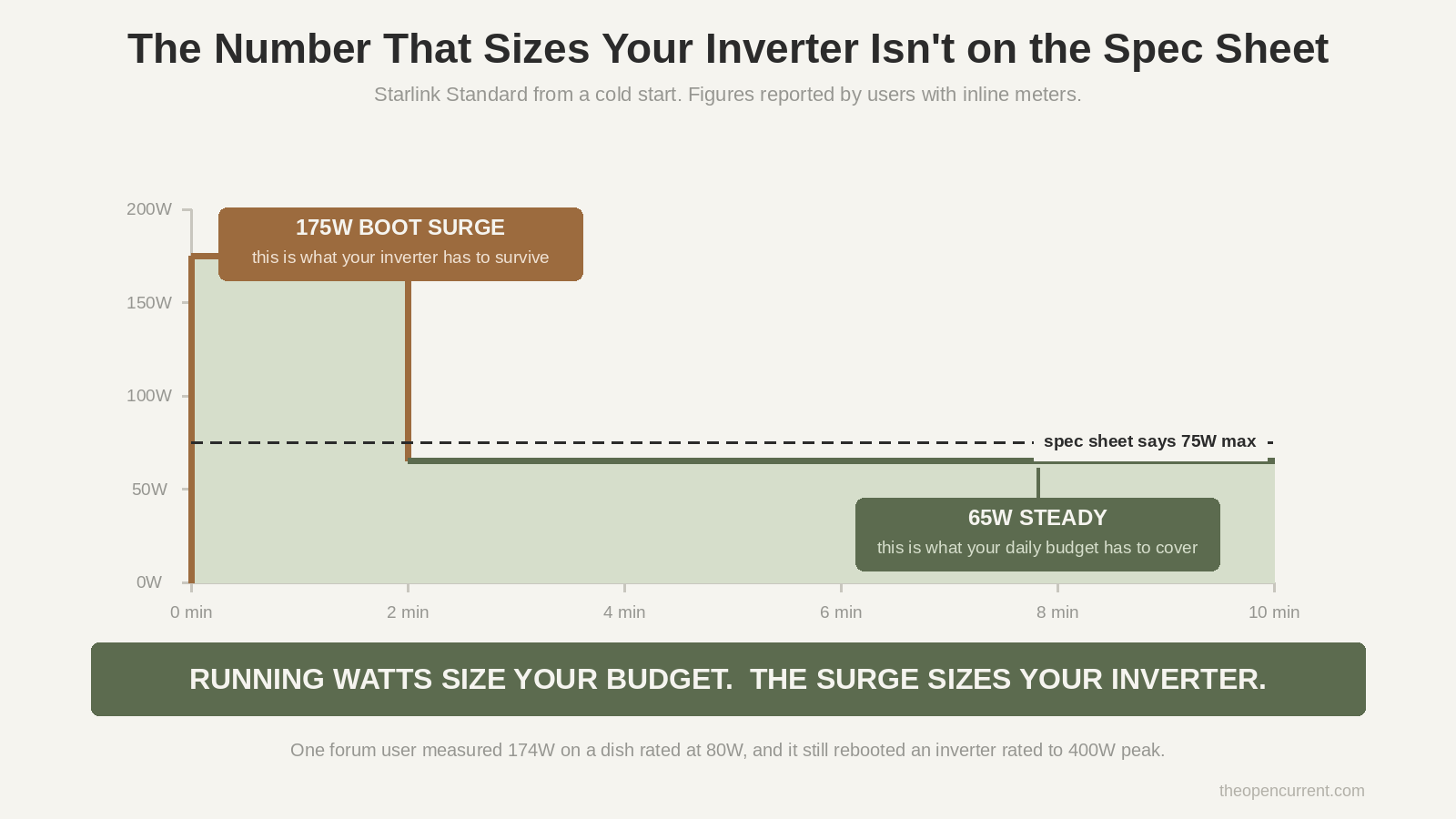
A Reddit thread on Starlink power consumption puts it plainly: plugged in cold, the dish pulls around 175 watts for a minute or two, then settles to about 65. On a system spec’d at 50 to 75W.
There’s a Victron community thread that’s even better, because the guy actually measured it. His Gen 1 dish ran at about 80W normally and he clocked it at 174W for a second during startup. He tried to run it on a Phoenix 12/250, which is rated to 400W peak. Comfortably within spec, right?
It rebooted about 30 seconds after power up. Every time. The inverter tested fine. The wiring tested fine. The surge just didn’t care.
If you’ve read the well pump guide you already know where this goes. The running watts size your daily budget. The surge sizes your inverter. Two different numbers doing two different jobs, and people size for the wrong one constantly.
Original diagram. Reuse it with a link to theopencurrent.com.
Thing two: the inverter tax, and this is the actual headline
Starlink does not sell a DC power supply for the Standard dish. It ships with an AC brick. So unless you go out of your way, off-grid means you’re running it through an inverter.
And an inverter is not free.
There’s a bloke who built his own DC power supply and PoE injector for a rectangular dish and wrote up the whole thing, measurements included. His numbers: a typical inverter burns 10W or more just existing, plus another 1.5W or so in conversion losses. Which turns an average 35W Starlink into roughly 46W pulled from the battery.
That’s a 31% tax on a load you haven’t changed at all.
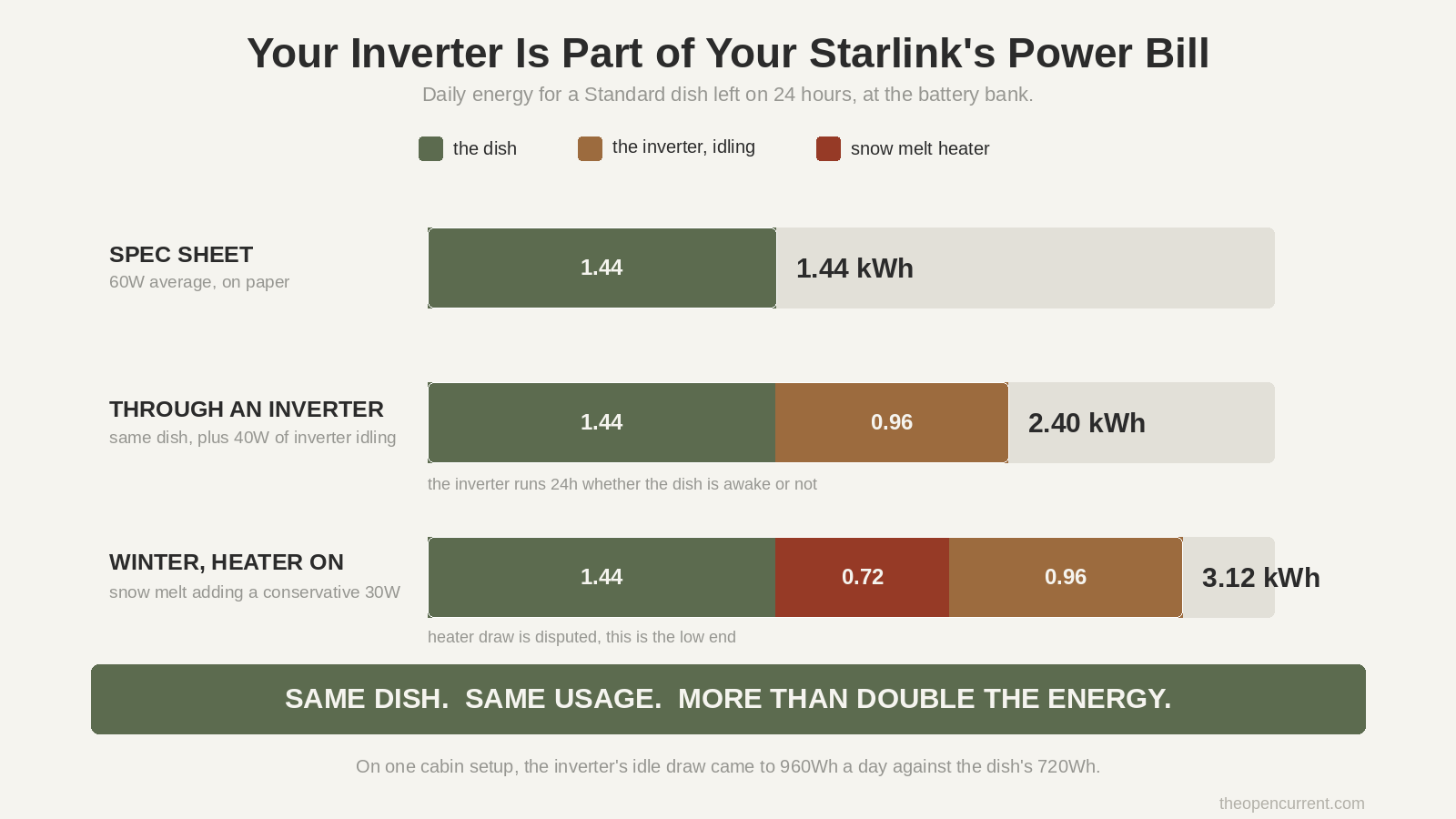
And it gets uglier at house scale. There’s a DIY Solar Forum thread where somebody works the real arithmetic for a cabin. His 1000W inverter drew 40W with literally nothing plugged into it, and the 3500W unit he replaced it with idles at about 50W. Taking the smaller of those two, the maths becomes: 40W of Starlink for 18 hours, plus 40W of inverter for 24 hours.
720Wh for the dish. 960Wh for the inverter.
Read that again. The inverter costs more than the Starlink does. Your internet is the smaller half of your internet’s power budget.
Nobody puts this in a Starlink power consumption article, because every article on the topic is written by somebody selling you a battery, and “your inverter is the problem” doesn’t sell batteries.
Original diagram. Reuse it with a link to theopencurrent.com.
Thing three: snow melt arrives in your worst month, and nobody agrees how big it is
Every dish from Gen 2 onwards has a heater laminated behind the array, with one exception I’ll come back to. It fires automatically when it detects moisture at or below freezing. You don’t get a say unless you go into the app and turn it off.
Now, how much does it draw? Buckle up, because the sources are all over the place.
- Wattmeter measurements from cold climate users: an extra 20 to 30W on top of normal draw
- A solar forum veteran: the heater is a power boost to the dish circuitry and can draw 150W or more, and it cycles on outside temperature alone, so it can fire on a cold clear day with no snow anywhere
- A Starlink rep, relayed secondhand: about 165 watts to melt roughly three inches of snow
So the honest answer is somewhere between plus 20 and plus 180 watts, and I’m not going to pretend otherwise by picking one and printing it in bold. If anyone quotes you a confident single figure for snow melt draw, they’re guessing harder than the data supports.
Worth saying why the numbers scatter that badly. Some people are measuring a dish that’s actively melting snow, some are measuring one that’s just warming itself because the air is cold, and the pre-heat setting is a third thing again. Those are three different loads getting reported as one.
What I am confident about is the shape of the problem. That heater runs in winter. Winter is when your array produces least. And cold batteries deliver less peak current than warm ones.
Three failures stacking in the same month. Shorter days, lower sun angle, cold chemistry, and now a load that just went up. That’s the same coupling I bang on about in the off-grid solar guide, where I make the case that winter sun hours are the only number worth sizing against. Starlink is a textbook example of why.
If you’re in a properly cold climate, set snow melt to Off and turn it on manually when there’s actual freezing moisture coming. One caravan forum user did exactly that and watched his average drop from the high sixties to 39W, and reported the router stopped running hot as a side effect.
Thing four: it never turns off
A well pump surges and stops. A fridge cycles. Lights get switched off when you go to bed, mostly.
Starlink just sits there, 24 hours a day, quietly eating.
That’s the worst shape of load an off-grid system can carry, and it’s exactly the same argument I make about aerobic septic aerators in the off-grid cost calculator. A continuous load has no gaps for your bank to recover in. There’s no duty cycle doing you a favour.
A Standard dish running around the clock lands somewhere near 1.4 kWh a day before you’ve added the inverter. For a lot of small cabin systems, that’s a genuinely significant chunk of daily production going to something that isn’t lights, water or refrigeration.
Starlink Mini power consumption, and why it might be the right dish
Here’s where I argue against the obvious purchase, which is a thing I do a lot around here.
The Mini looks like the compromise option. Smaller, slower, cheaper, the one you buy if you can’t afford the real thing. For a lot of off-grid properties I think it’s actually the correct choice, and the power story is most of the reason.
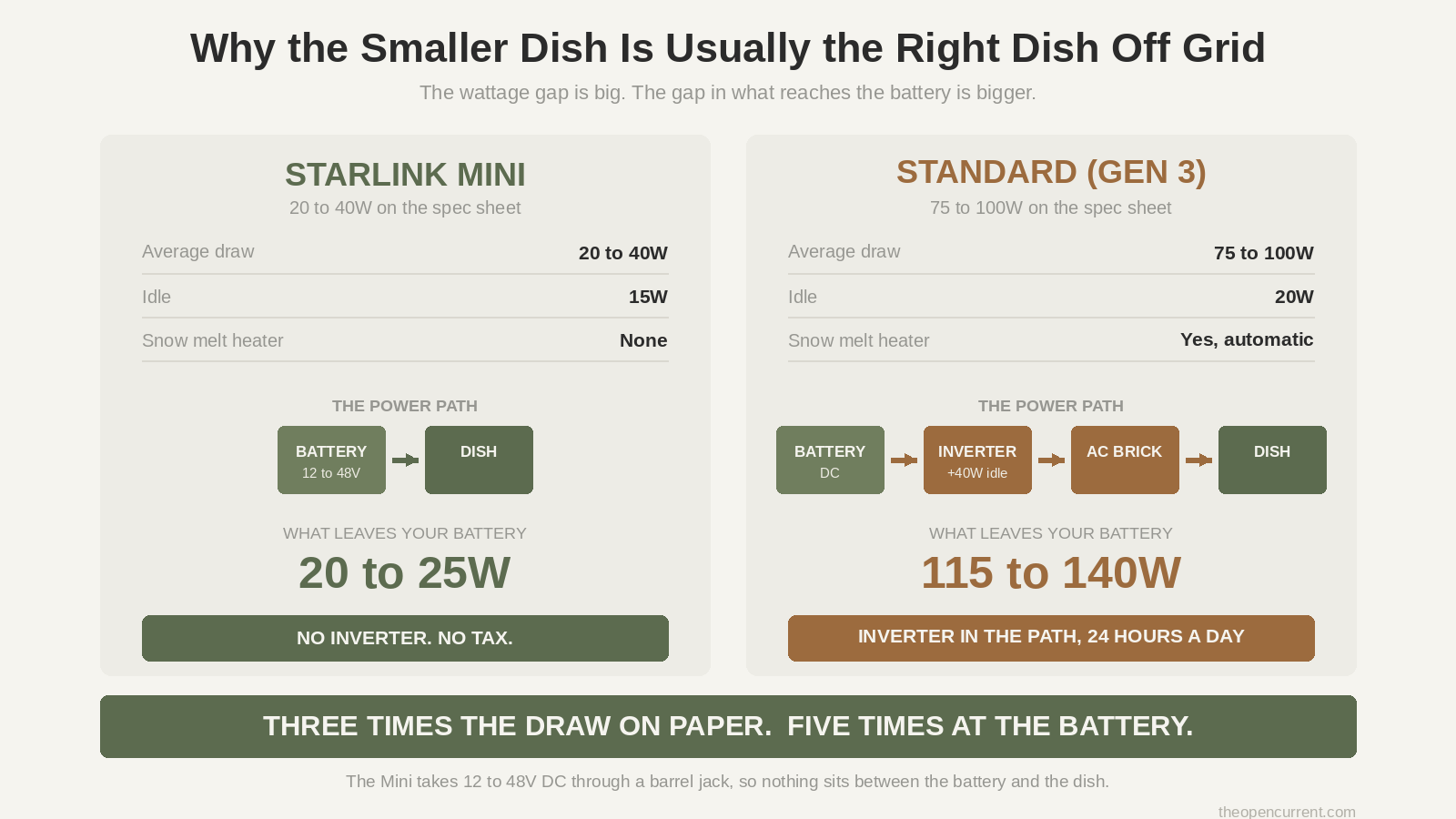
It’s a third of the draw. 20 to 40W average, 15W idle, against 75 to 100W for a Gen 3 Standard.
It has no heater. None. So the whole snow melt mess above simply doesn’t apply, which also means no mystery winter spike.
And this is the big one: it takes DC directly. The Mini accepts 12 to 48V through a barrel jack. You wire it to your battery bank and you’re done. No inverter. No inverter idle draw. No 31% tax. That entire section above just evaporates.
So compare honestly. A Gen 3 Standard through an inverter might be pulling 115 to 140W from your bank. A Mini wired direct might be pulling 20 to 25W. That’s not a small difference, that’s four or five times, and on a marginal system it’s the difference between needing another panel and not.
What you give up is speed and a bit of resilience in heavy snow, since the Mini has no heater to clear itself and you’ll be walking out with a soft broom. Never metal, unless you enjoy scratching a phased array.
If you’re running a business off the connection, take the Standard and budget the power properly. If you’re a cabin, a homestead or a small build where power is the binding constraint, the Mini is probably your dish.
Original diagram. Reuse it with a link to theopencurrent.com.
Sleep mode, and why the advice you’ve read is probably wrong for your dish
There’s a Sleep Schedule in the Starlink app under Settings, and every off-grid article tells you to turn it on. Whether that’s good advice depends entirely on which dish you own, and I’ve not seen anyone say so.
On a Standard, it’s genuinely worth doing. Somebody measured a Gen 3 Standard at the plug with sleep mode on and off, and got a 60% reduction. That’s real money in a battery bank.
On a Mini, it’s close to pointless. The gap between idle and sleep is about 2 to 6 watts. Cutting power entirely saves the whole 15 to 17W idle draw instead.
So on a Mini, a physical switch beats the app, and it’s not close. You’ll pay a couple of minutes of cold boot in the morning to get satellite lock back. That’s a fine trade for an extra 130Wh overnight.
One thing worth knowing either way: the app’s sleep schedule only does one block per day and it runs on UTC, which has caught a lot of people out. Set it, then check it actually slept.
The bit nobody covers: your dish and your panels want opposite skies
This is the one I got genuinely excited about, because I can’t find it written down anywhere.
In the US, Starlink’s satellite traffic is heaviest in the northern sky. Terrain or trees blocking your north blocks more active passes than the same obstruction to the south.
Your solar array faces south.
So on a wooded lot you’re now clearing sightlines in two opposite directions, for two different systems, that both live on the same property.
I found this half stated in a TractorByNet thread where someone’s told that since his panels face south, the dish position he’s picked will be aimed too much into the end of the house and he should expect obstructions. Nobody in the thread spells out the general rule, but that’s what it is.
And it compounds. The mast tall enough to clear your canopy for the dish is now a new object that casts a shadow. On a small array in winter, with the sun low, that shadow is longer than you think. Worth reading the series vs parallel guide before you site the mast, because how your panels are wired changes how much a shadow across one of them actually costs you.
Site them together. Don’t put the dish up, then work out where the panels go.
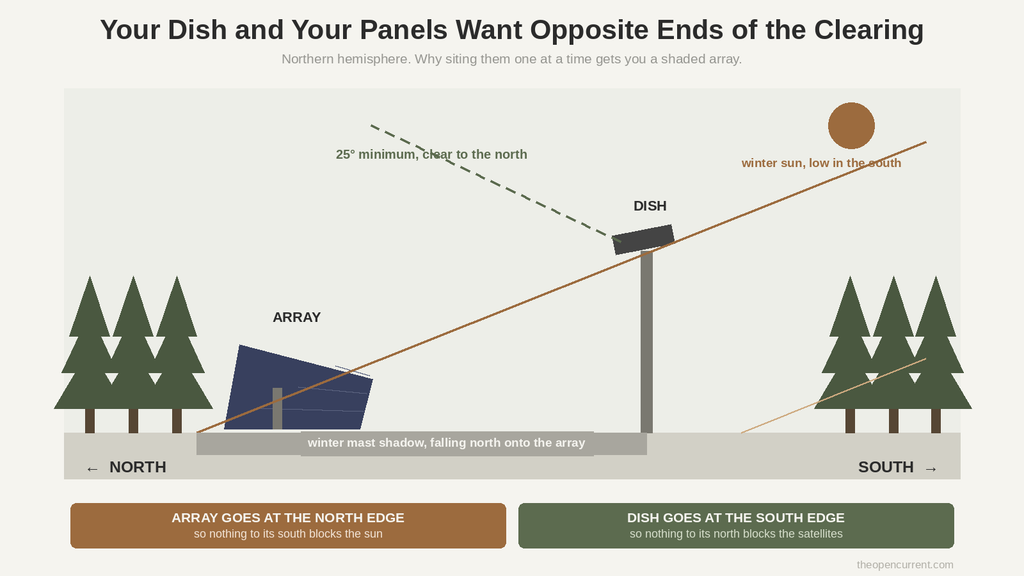
Original diagram. Reuse it with a link to theopencurrent.com.
What actually goes wrong
Every one of these came out of a forum thread where somebody was stuck, which is where the useful information lives.
Boot loops from voltage sag. Described as the single most common problem on 12V setups. The dish starts, lights flash, it dies, it tries again, forever. Almost always thin wire, a cable run that’s too long, or a battery sitting a bit low, so voltage drops below threshold at the exact moment the dish pulls its startup current. Tell: if it works with the engine running and quits when you switch off, that’s this.
Modified sine wave inverters. There’s an iRV2 thread where a Gen 2 works perfectly on shore power and reboots constantly on an inverter, and the forum’s first answer is the right one. Dirty modified sine output. Get a pure sine wave inverter, or accept the reboots.
Cheap inverter power saving that breaks the boot. This one’s properly counterintuitive. The obvious fix for inverter idle draw is the inverter’s own search or eco mode, where it pulses and only wakes on load. Except Starlink’s startup current may not reliably trip the load threshold, so the inverter half wakes, doesn’t see enough draw, and shuts down again before the dish has finished booting. The efficiency feature and this specific load do not get along.
It doesn’t always come back. A rural Queensland user reported the dish sitting on DISCONNECTED after his generator came back up. Twice. So a power cut isn’t necessarily a power cut plus five minutes, it’s sometimes a power cut plus a support ticket.
Batteries in the cold. Cold cells deliver less peak current, which lands in the same month as the heater load and the worst solar. I keep coming back to winter because winter is where off-grid systems fail.
Plan B, and you should have one
Starlink is one company, one constellation and one subscription, powering something you might be running a business on. Worth thinking about what happens when it’s down.
Cellular is a tenth of the power. A signal booster plus an LTE router runs somewhere around 8 to 25W all in. Against 50 to 100W for a Standard dish. If you’ve got any usable signal at all, that’s not just a backup, it might be your primary in the months when power is tight.
The resilient setup is both. Starlink as primary with automatic cellular failover comes in under 80W with both running. If your connection is load bearing, that’s the answer.
And the honest limit: plenty of genuinely remote properties have no cell signal whatsoever, and more than people expect. If that’s you, there is no cellular failover, and Starlink isn’t your best option, it’s your only one. Plan the power system knowing that, and keep a communication method that doesn’t depend on the internet at all. That’s a safety item, not a connectivity one.
What to check before you spend a penny
The hardware isn’t cheap, and nobody is taking it back cheerfully once you’ve drilled a mast into your roof. Do this first.
Run the obstruction check where the dish will actually go. Not standing in the yard holding your phone at chest height. Get the ladder out and hold the phone at the real mount point. One forum user found the optimal position wasn’t remotely where he expected once he checked properly. You’re aiming for 0%.
Walk the whole property. A clearing a hundred feet from the house can scan dramatically better than the roof. An outbuilding might have a cleaner horizon than anything on the house. Check several spots.
But know the reverse trap: a small clearing ringed by tall trees can still block most of the sky you need, even when straight up looks wide open. Overhead isn’t the test.
The 25 degree rule. From the mount point, nothing should block a cone from 25 degrees above the horizon up to straight overhead, in every direction.
And a caveat on the percentage, because this surprised me. The obstruction number doesn’t map cleanly onto how it feels. One TractorByNet user had the app predicting 8 to 10 hours of outages a day and Netflix streamed without interruption. Another with a much smaller obstruction had Apple TV freezing every few minutes and losing its place. Same technology, wildly different tolerance depending on what you’re doing with it.
Questions to answer before you buy
- Which dish, and does it need an inverter? The Mini takes DC direct. The Standard doesn’t. This is the single biggest lever on the whole list.
- What does my inverter idle at? Go and measure it with nothing plugged in. If that number is bigger than your dish’s draw, you’ve got an inverter problem, not a Starlink problem.
- Can my inverter survive roughly double the running watts on boot, and is it pure sine?
- What’s my winter number? Snow melt on, solar at its worst, cold battery. Not the summer average.
- Will I run it 24/7, or schedule it off? And if it’s a Mini, a switch beats sleep mode.
- Does the mast that clears my trees shade my array?
- Have I run the obstruction check at the real mount height, in more than one spot?
- Do I have any cell signal at all? If no, there’s no plan B and the power system has to be sized like the connection is critical infrastructure.
FAQ
How much power does Starlink use? Officially 50 to 75W for a Standard Actuated, 75 to 100W for a Gen 3 Standard, 110 to 150W for High Performance, and 20 to 40W for a Mini. Off-grid, add your inverter’s idle draw on top, because that runs 24 hours a day whether the dish is awake or not.
How many watts does Starlink use per day? A Standard running continuously is roughly 1.4 kWh a day at 60W average. Through an inverter idling at 40W, the real figure is closer to 2.4 kWh. Winter with snow melt pushes it higher again.
What is Starlink Mini power consumption? 20 to 40W average and about 15W idle, with a boot spike of 40 to 60W. Because it accepts 12 to 48V DC directly it needs no inverter, so the number from the battery is close to the number on the spec sheet. That’s not true of any other model.
Can I run Starlink on solar? Yes, and plenty of people do. Size for your worst month rather than your average, budget the inverter’s idle draw as a separate always-on load, and if you can choose the dish, choose the one that runs on DC.
Does Starlink use more power in winter? Yes, on every model except the Mini. The snow melt heater fires automatically at or below freezing, and published estimates of what it draws range from an extra 20W to around 180W. It also cycles on temperature alone, so it can run on a cold dry day with no snow at all.
Should I turn on Starlink sleep mode? On a Standard, yes, it’s been measured at around a 60% reduction. On a Mini, barely worth it, since sleep only saves 2 to 6W against the 15 to 17W you save by cutting power entirely.
Why does my Starlink keep rebooting on an inverter? Three usual suspects. The inverter is modified sine wave rather than pure sine. The inverter is in a power saving mode that won’t stay awake for the boot. Or voltage is sagging under the startup surge, which on a DC setup usually means wire that’s too thin or a run that’s too long.
Where to go next
- Free solar battery calculator. Put a continuous 24 hour load through it and watch what it does to your bank sizing.
- Off-grid solar kit buying guide. Including why most kits are priced badly once you look at the battery.
- Off-grid water systems. The other system on your property with a nasty surge problem.